
Instantly Integrations
Your whole GTM stack, wired into every reply.
Connect Instantly to 180+ apps (your CRM, Slack, calendar, enrichment, LinkedIn and forms) and let replies, opens and status changes do the busywork for you. No code required.
Join 50,000+ sales teams using Instantly.

 HubSpot
 Slack
 Calendly
 Pipedrive
 Attio
 HeyReach
 Notion
 Typeform
 Intercom
 HighLevel
 Clay
 Airtable
Pick your stack. Watch it wire itself.
Choose the tools you already use and see a workflow you could turn on today.
What starts it
Your tools
Workflow
- Trigger · InstantlyLead marked Interested
- HubSpotUpdate Contact
- SlackSend Message
Live feed
- Press Run test to see each step complete.
Sample run for illustration. In Instantly you test each step with real data before going live.
180+ apps. One place to connect them.
Pick an app, sign in with your own account, and it’s ready to use in any automation.
CRM apps
- HubSpot
- Pipedrive
- Attio
- HighLevel
- Act!
- Bigin by Zoho CRM
- Capsule CRM
- Close
- Copper
- EngageBay
- folk
- Freshworks CRM
- Less Annoying CRM
- Nimble
- Nutshell
- OnePageCRM
- Pipeline CRM
- Salesmate
- Streak
- Teamleader
- Tented
- Twenty
- Zero
- Zoho CRM
184 apps today, and growing. The up-to-date list lives in the app picker inside Automations.
From “connected” to “done” in three steps.
Connect your app
Sign in with your own account (OAuth or API key) from Settings → Integrations, or right inside the automation builder.
Choose what starts it
An Instantly event, like a reply, an open, a bounce or a lead marked Interested. Or an event in your app, like a new HubSpot contact, a Calendly booking or a new Typeform response.
Add the steps
Create a deal, post to Slack, add the lead to a campaign, wait two days, branch on a condition, or let AI classify the reply and route it.
Plays your team can turn on today.
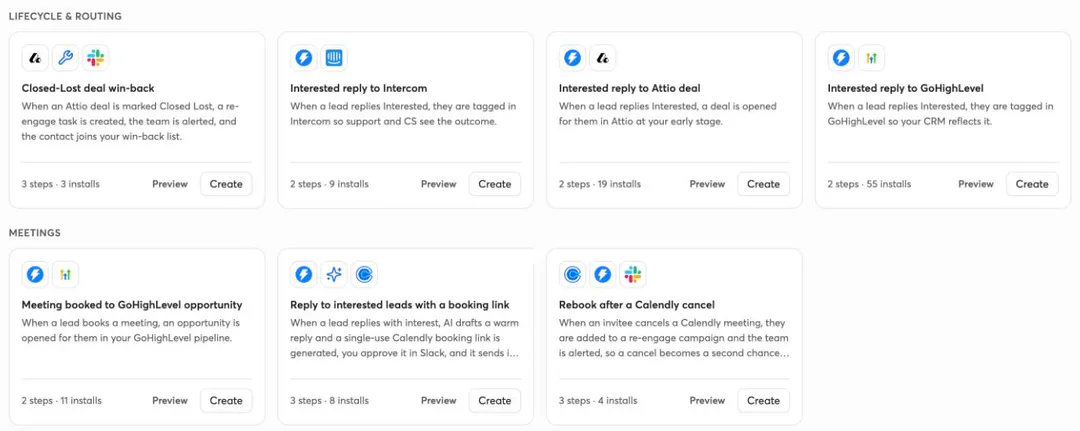
Start from a ready-made template or build your own. A few favorites:
Interested reply → Attio deal.
When a lead replies Interested, open a deal in Attio at your early stage.
Flow:Reply: InterestedCreate Attio deal
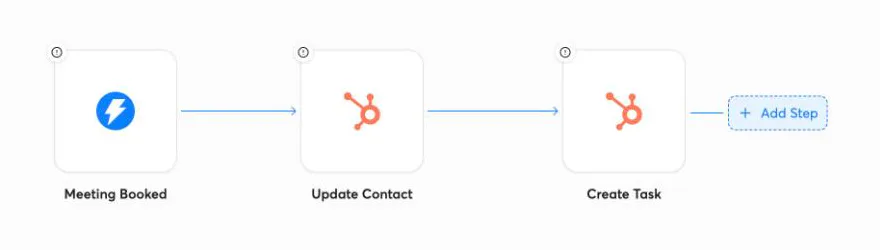
Meeting booked → HubSpot.
When a lead is marked Meeting booked, update the HubSpot contact and create a follow-up task.
Flow:Meeting bookedUpdate contactCreate task
Hot lead → Slack.
When a lead is marked Interested, post the details to your team’s Slack channel.
Flow:Marked InterestedPost to Slack
New HubSpot contact → email + LinkedIn.
Add new HubSpot contacts to an email campaign, wait two days, then add them to a HeyReach LinkedIn campaign.
Flow:New HubSpot contactAdd to campaignWait 2 daysAdd to HeyReach
Calendly cancel → second chance.
When someone cancels a Calendly meeting, add them to a re-engage campaign and alert the team in Slack.
Flow:Calendly canceledAdd to campaignAlert in Slack
Closed-lost → win-back.
When an Attio deal is marked Closed Lost, create a re-engage task, alert the team and add the contact to your win-back list.
Flow:Deal Closed LostCreate taskAlert teamAdd to list
AI does the reading. You keep the final say.
Classify and score.
Add an AI step to sort replies by intent, score leads against your ICP, extract data or draft a message, with models from OpenAI, Anthropic, Google and more.
Approve in Slack.
Pause any workflow for a human check. Approve and Reject buttons land in Slack, and nothing moves until someone decides.
Describe it, get it.
Tell Instantly AI what you want in plain English (“when a lead books a meeting, update HubSpot and ping me in Slack”) and it drafts the workflow for you.
Not on the list? Connect it anyway.
Every workflow has developer tools built in.
Developer docsMissing an app? Request it from the app picker.
Webhooks
Start a workflow from any tool that can send a webhook.
HTTP requests
Call any API from a step.
Code steps
Run JavaScript when you need custom logic.
API & Zapier
Use the Instantly API, or connect through Zapier.
Built to run while you sell.
Test before you go live.
Run each step with real data before switching the workflow on.
See every run.
A live feed shows each run and the data every step produced.
Fails safe.
A workflow that keeps failing, or loses a connection, pauses itself instead of misfiring.
Your account, your keys.
You connect with your own login, credentials are stored encrypted, and you can disconnect any time.
Questions, answered.

Your stack is already there. Put it to work.
Connect your first app and turn on your first play today.